Clinic Match Explained
Clinic Match Explained
Clinic Match Explained
Junior and Senior Clinics are open-ended projects in which students apply both technical and non-technical engineering skills to solve challenging problems. Clinic Match facilitates the matching of students to projects proposed by faculty. Please familiarize yourself with the match procedures and timelines below.The Process
1. Faculty Input. Professors propose their clinic project ideas prior to the start of the term. They specify their student needs with either: (a) the number of students from each engineering discipline, or (b) the total number of students, regardless of their engineering discipline. This submission process may continue until the first clinic day.
2. Project Sign-up. Students will select 8 unique projects that interest them. Students can edit their responses up until the listed sign-up deadline. This will not affect their place in line, so submitting early is preferred.
3. Project Discussion. Professors and faculty can use the first clinic period (12:30pm to 3:15pm on Tuesday) to pitch their projects. During Fall semesters, the second clinic period may be used for pitches. It is recommended that students attend to learn more about the opportunities and ask questions.
4. The Match. The clinic sorting algorithm is executed after the given deadline for student submissions. This algorithm automatically assigns students to projects based on a set criteria. The details of the criteria are provided below. It is in your best interest to familiarize yourself with the criteria.
5. Broadcast. Discipline Managers (DM) make final adjustments to the Match within their departments. These adjustments are typically minor. The results are broadcast to faculty and students soon after. Students report to their assigned clinic faculty to begin their projects for the semester.
Sample Project Information
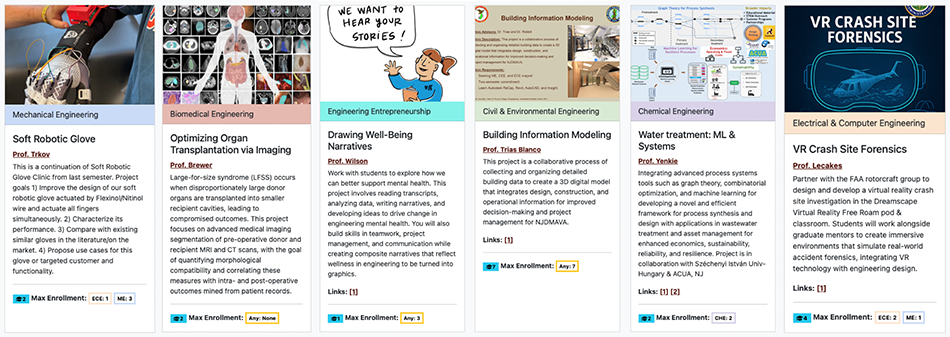
Students. Once faculty propose projects, they will be displayed as project cards similar to the ones shown above. They indicate the project discipline, a brief description, and the project needs in terms of majors of students being recruited. It will also indicate how many students have selected that project as their top choice. This way you know which projects are competitive. Disciplines or majors are color coordinated to help you navigate.
Faculty. To prepare project cards that are appealing, some guidelines: 1. Identify what the students will gain, 2. Indicate the skills required to succeed, 3. Add an attractive image to the card, 4. Share links to add further insights.
Algorithm Details
The Criteria. The Clinic Match algorithm assigns students based on a priority criteria.
- The highest priority goes to students specifically requested by the faculty. If a student is requested by faculty AND the student lists the same project as their top choice, the match is almost guaranteed. In rare cases, Discipline Managers (DMs) may still reassign you based on departmental needs.
- Seniors have a higher priority than juniors.
- Students with experience on the project may have priority over new applicants.
- If all criteria are the same for two students, priority goes to the one that submitted the form earlier. So get in early.
Match Outcome. Unfortunately, there is no guarantee to get one of the eight choices. If all the student requests are filled with higher priority students, or the sign-up form was not submitted, students will be initially unassigned. The DMs will then assign students to a project as they see fit. If you notice mistakes or concerns with your final assignment contact your DM first.
Guided Selection. Use the project information to identify popular projects with high Popularity Index (P.I.). It is better to choose a less popular clinic project that still holds your interest rather than risk being assigned to any open project during the manual assignment process.
Frequently Asked Questions (FAQs) for Students
How can I increase my odds of getting into a project?
To enhance your chances of being selected for a project, reach out to the faculty advisor overseeing it. Discuss the project details and if interested request the faculty member to add you as a requested student.
If you designate their project as your top preference and they extend an invitation to join, your acceptance into the clinic is highly likely.
Note: Allocating all eight of your choices to a single project does not improve your chances of being accepted into that particular clinic.
What does P.I. mean?
Popularity Index. This indicates the number of students who selected a particular project as their top preference. The higher the PI, the lower the chance that you will be selected for that project. In other words if the project is competitive, it may be difficult fo you to join that project.
How do I switch sections inside banner?
Follow the following guide:
- Visit Section Tally
- Select the term
- Select your clinic advisor for professor and search
- Find their section of JR/SR clinic
- Note down the CRN
- Navigate to Banner Registration
- Select "Register for Classes"
- Select the term and continue
- Perform Add/Drop
- Drop old clinic section by selecting DROP from menu
- Go to the Enter CRN tab
- Enter in CRN you noted down
- Register for that course
Can I edit my response?
Absolutely, in fact, you're encouraged to do so.
Your position in the queue remains constant regardless of whether you edit your response. Thus, it's advisable to submit your response as early as possible.
I forgot to submit the form! What do I do now?
Contact your Discipline Manager listed on Clinic Match. However, please note that there is currently no guarantee of securing a specific project at this time. You may have lost the privilege to select.
Where do I go when I get assigned a clinic?
You should recieve an email from your clinic manager(s) regarding your assignment details. If you do not receive any direction, show up to their office for the next clinic period.
When do I need to be there for clinics?
You are required to be available and working on the project on Tuesday and Thursday from 12:30 pm to 3:15 pm. You may not meet your project manager or supervisor during both days. Meetings are often scheduled on weekly basis and will be communicated by your project manager. Please contact your clinic manager(s) for any scheduling questions.
On the first day of clinics, do I need to attend and where?
Project pitches will take place on the first day or week of clinics. That week of selection is important for you to gather information about the clinic projects. You will receive notification via email regarding the details. You are encouraged to explore projects that align with your interests. Once you are happy with your preferences, you can submit your choices through Clinic Match.
I do not like my assigned project, what do I do?
Students are encouraged to discuss their selections with the faculty to have a clear idea of what the project entails prior to Clinic Match. However, some students still find themselves in a place where they do not like their projects. Unfortunately, there is very little that can be done at this point. You should discuss the project scope with your faculty advisor and discuss how you may contribute better. Consider this as an opportunity to tailor your experience to your liking.
I do not see my assigned project, who should I contact?
Please reach out to your Discipline Manager. However, please be aware that there is currently no assurance of securing a specific project at this time.
I need a pre-requisite override, what do I do?
Pre-requisite overrides can be approved by your academic advisor or your transfer advisor. Ensure you explain your situation and provide the Banner ID and major for reference.
Frequently Asked Questions (FAQs) for Faculty
Can I edit my submission?
Certainly! You are permitted to do so. An email has been sent to you regarding your response. Inside the email, you will find instructions to edit the response. After submitting the edits, please allow up to 30 minutes for the changes to take effect.
How can I create a project that is meaningful to students?
To ensure a student engages with your project, clarity is key: clearly define project goals, tasks, and deadlines upfront. Make the project relevant by linking it to their interests and future aspirations, and offer autonomy by allowing them to choose aspects of their involvement. Provide continuous support, guidance, and constructive feedback throughout the project's duration, and encourage collaboration with peers to foster teamwork. Celebrate milestones to maintain motivation and emphasize the real-world applications of their work. Connect the project to their personal values and goals to enhance intrinsic motivation, and maintain accountability through regular progress checks. These strategies collectively create an environment conducive to active student participation and investment in the project's success.
What is a typical size of a team?
The typical size of a clinic team is 4. There is two ways to request students, by discipline or by number. The latter increases chances of students working on the project because of their interest.
What will happen if not enough students or no students select my project?
You have the option to proceed with the project with the limited number of students available or to cancel the project altogether. Work with your Discipline Manager to manage such situations.
How do I decide who is the project manager for our project?
The project manager is the primary contact and the person who assigns the grades to the students. Often they are the sponsor of the project and have a clear scope of the project. Clearly define the project roles before selecting the project manager. The project manager must setup weekly meetings with the team to provide guidance and feedback.
Can I submit multiple projects?
Yes. You will be prompted to submit another project after you complete a submission. You are advised to limit the number of projects based on your level of availability for advising. Regular meetings are necessary to guide studnets.
I requested a student who had previously worked on my project. Why are they not involved in my project this semester?
Students can choose whether to continue previous projects or start new ones each semester. We regret any inconvenience this may cause for your project and its goals. We must respect the students' freedom to choose.
What is the process for evaluating a student's performance in my clinic?
Use the Syllabus of JR/SR Clinics as a guide.
How do I add/request MET or EET students to my clinic?
In the algorithm, MET students are considered the same as ME students, and EET students are considered the same as ECE students. Therefore, if there is an available slot for an ME or ECE student, either MET or EET students can occupy it.
Fall and Spring Key Dates
| Event | Fall Key Dates | Spring Key Dates |
| Faculty Submission Closing | 9 am, Sunday before semester start | 9 am, Sunday before semester start |
| Student Submission Opening | 9 am, Monday before semester start | 9 am, Monday before semester start |
| Student Submission Closing | 9 am, Friday, first week | 9 am, Wednesday, first week |
Discipline Managers (DMs)
| Discipline | Manager (Email) |
| Mechanical Engineering (ME) | Dr. Nath (nath@rowan.edu) |
| Electrical & Computer Engineering (ECE) | Dr. Wang (wanghu@rowan.edu) |
| Civil Engineering (CE) | Dr. Zhu (zhuc@rowan.edu) |
| Chemical Engineering (ChE) | Dr. Stanzione (stanzione@rowan.edu) |
| Experiential Engineering Education (EXE*) | Dr. Jamison (jamisonc@rowan.edu) |
| Biomedical Engineering (BME) | Dr. Brewer (brewere@rowan.edu) |
*Note: “EXE” in the clinic match portal is the ExEED Department
Application Administrator
Nicholas Bovee, Senior Staff Engineer